 Swedish web site


TDDE19 Advanced Project Course - AI and Machine Learning
Projects
Projects
Each student individually ranks all projects once the project list is published. Based on these rankings, groups of around 6-7 students are formed and assigned to projects. Several groups will work on the same project: each project is assigned to two or more groups, which are supervised jointly by the same supervisor but carry out and report their work as separate, independent groups. The number of groups a project is expected to take is given in parentheses after the supervisor.
At the end of the project, the students are expected to provide:
- Source code of library/program in a gitlab repository
- Documentation of how to use and install the software (API, command line...)
- A group report describing the work that has been accomplished (which algorithms are used, what kind of results were obtained...)
- An individual list of contributions to the project.
Important: how to submit your ranking, and the ranking deadline, will be announced together with the project list (see All Messages).
Project list
1) Swedish, not translated
Seed-Grounded Generation of Natural Swedish Instruction Data
Customer/Supervisor: Kevin Glocker (2 groups)

Context:
Instruction tuning is the standard way to make base language models usable, but
for languages like Swedish the required data is almost always obtained either by
machine-translating English instruction sets or by prompting an aligned LLM to
synthesize instructions from scratch (e.g. MAGPIE). Both inherit the
distribution of an English-centric model. The resulting Swedish is grammatical
but flattened, and models fine-tuned on such data can lose idiomatic competence
relative to their base model. A less-explored alternative for Swedish is to
ground generation in authentic target-language text. This project develops and
evaluates a seed-grounded generation method for Swedish instruction data:
documents sampled from Swedish seed corpora condition the synthesis, so that the
generated instructions inherit the register and idiom of real Swedish rather than
of translated English.
Goals:
Develop a method for generating natural, diverse Swedish instruction data by
grounding synthetic generation on documents efficiently sampled from Swedish seed
corpora, and determine whether models trained on it gain linguistic and
idiomatic competence, and at what cost.
Task suggestions:
- Seed corpora: Assemble Swedish seed corpora across registers (Wikipedia, Riksdagen open data, news, forum and web text).
- Generation pipeline: Implement seed-conditioned synthesis, ideally including deduplication and seed selection based on quality and diversity.
- Dataset evaluation: Evaluate the generated datasets with dataset-level metrics for diversity (type-token ratio, task-type coverage and similar).
- Fine-tuning: Fine-tune small LLMs (e.g. Gemma, Apertus) on the new dataset and on translated and MAGPIE baselines at a matched training budget.
- Model evaluation: Evaluate the models on linguistic acceptability and idiomaticity using existing minimal-pair benchmarks, and on downstream performance using EuroEval. Measure the trade-offs between approaches and task types.
- (Optional) Human evaluation: Small-scale human evaluation of naturalness and idiomatic quality.
References:
- Magpie: Alignment Data Synthesis from Scratch by Prompting Aligned LLMs with Nothing | GitHub
- EuroEval (formerly ScandEval): European language model benchmark with Swedish tasks | GitHub
- Apertus: fully open multilingual LLM, 8B and 70B | tech report
- Gemma 3: small open instruction-tuned models suitable for fine-tuning
- Riksdagen open data: Swedish parliamentary documents, one candidate seed corpus
2) Semantic Mapping
Customer/Supervisor: Piotr Rudol (2 groups)
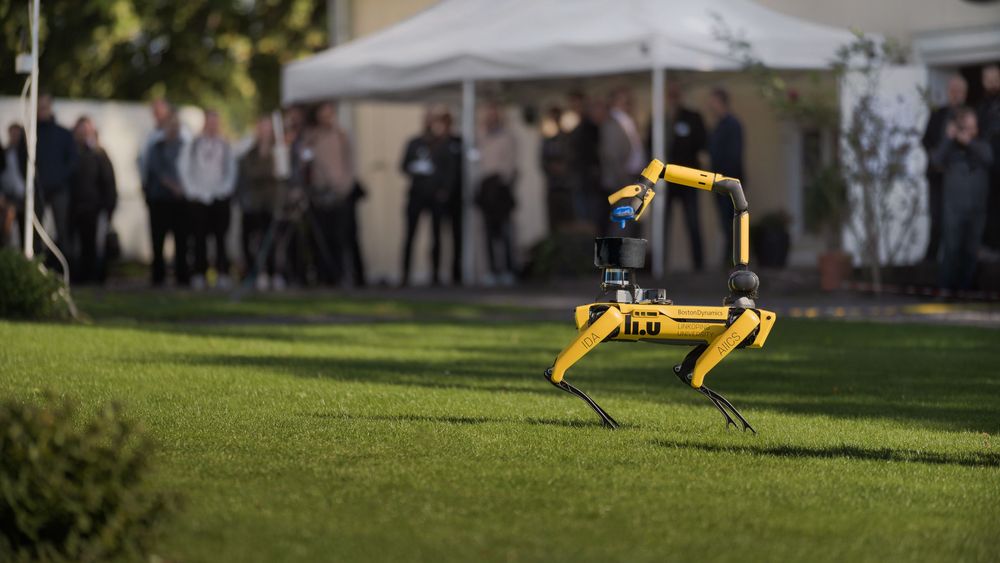
(Image from WARA-PS)
Context: the goal of this project is to explore the use of machine learning to build semantic map of the environment using ground robotic system such as Boston Dynamics Spot robot operating in an indoor environment. Such map would include locations of detected objects, for example TV, chair, desk, vehicle, etc. The task could be achieved using vision-based CNN models in combination with sensor fusion algorithms such as Extended Kalman Filter. Semantic information would be stored in the robot’s knowledge database using Resource Description Framework (RDF) Graphs. Initially, the work would be performed on pre-recorded log files, with the possibility of running and test.
The project is a continuation of the semantic mapping project that ran in the course last year, and starts from what those groups achieved.
Goal: Develop and evaluate a semantic mapping pipeline that combines object detection, sensor fusion, and knowledge representation, first on recorded data and then on a real robotic platform. The system should robustly detect and track objects in indoor environments, and store semantic information in a structured format suitable for reasoning and future robot tasks.
Task suggestions:
- Study literature.
- Review and evaluation of available ML models for extraction of semantic information.
- Use of sensor fusion techniques for estimation and tracking of object locations.
- Deployment and evaluation of the project results on real robotic system.
References:
- YOLOv10
- Toward General-Purpose Robots via Foundation Models
- Hastily formed knowledge networks and distributed situation awareness for collaborative robotics
- Previous related student project
3) Pick Your Conversation
Tracking the Concurrent Conversations at a Table so a Hearing-Impaired Listener Can Choose What to Hear
Customer/Supervisor: Mattias Tiger (2 groups)

Context:
At a Christmas dinner or in a canteen, several conversations run at once and
people drift between them. For a person with hearing impairment this is the
hardest listening situation there is, and the reason is not volume: it is that
they cannot choose which conversation to follow, cannot notice their own name
being called in a conversation they are not attending to, and cannot recover
what they just missed. Premium hearing aids now steer beams toward multiple
talkers, but they have no model of a conversation, no overview, and no memory.
This project builds that missing layer. A phone placed on the table (optionally
one phone per person, forming an ad-hoc microphone array) listens, enrolls
everyone from a short round of names, and then diarizes, separates and
transcribes the table. On top of that, the system tracks which speakers form
which conversation and how those groups split and merge over time, presents
them as a live graph the user can tap to switch what is routed to their ear,
and alerts the user when another conversation says their name. The recognition
half of this is a live benchmark task (CHiME-9 MCoRec); the interaction half is
largely unstudied.
Goals:
Build and evaluate a table-top system that lets a hearing-impaired listener see
the concurrent conversations around them, switch between them, and be alerted
to what they would have wanted to notice, and show with human subjects whether
it measurably improves comprehension and reduces listening effort compared with
a live-transcription app.
Task suggestions:
- Capture and enrollment: Record from one or several phones, align the streams in time, and identify each participant from a short "say your name" round.
- Diarization and separation: Run and tune speaker diarization plus enrollment-cued target speaker extraction on real overlapping table audio; report DER and SI-SDR.
- Streaming transcription: Per-speaker low-latency transcription in Swedish and English, measuring word error rate against latency.
- Conversation tracking: Cluster speakers into concurrent conversations from turn timing, spatial cues and lexical coherence, and track splits and merges over time.
- Attention routing: Route the selected conversation to an earbud with the lowest latency you can achieve, and measure the tap-to-audio delay honestly.
- Cross-conversation alerts: Detect name-calls and user-chosen topics in the conversations the user is not listening to, at a fixed false-alarm budget.
- Interface: A glanceable conversation graph, per-conversation catch-up and summaries. Design target: the user's eyes stay on the table, not on the screen.
- Data collection: Record a corpus of scripted multi-conversation table scenarios with per-person close-talk reference microphones as ground truth (consent and data handling agreed with the supervisor).
- Evaluation: Layer metrics (DER, SI-SDR, clustering F1, switch latency) plus a human-subject study: comprehension, NASA-TLX effort, and eyes-up time against a no-feature baseline and a live-transcription app.
- Demo: A live table-top prototype, plus the measured curve of how much each extra phone on the table actually buys you.
References:
- CHiME-9 Task 1, MCoRec: concurrent conversations, "who speaks when, what, and with whom" | baseline code
- EasyCom: multi-channel egocentric conversation dataset in restaurant noise
- pyannote.audio: speaker diarization
- WeSep: target speaker extraction toolkit
- SimulStreaming: low-latency streaming Whisper
- KB-Whisper: Swedish speech recognition
- SI-SDR: the separation metric to use
- NASA Task Load Index: measuring listening effort
- Auracast: the broadcast-audio delivery path to hearing aids (stretch goal)
4) Jarvis
A Voice Assistant That Watches You Work, Answers Your Questions, and Knows When to Say Nothing
Customer/Supervisor: Mattias Tiger (2 groups)

Context:
"Basically, an Iron Man Jarvis." The hard parts of Jarvis are not speech and
not tool use: both are largely solved. The hard parts are grounding and
silence: understanding what you are doing well enough to answer questions about
it, and knowing when to speak up unprompted, when to ask, and when to say
nothing at all. That timing decision is an open research problem: a 2026
benchmark asks exactly "when should an intelligent assistant speak up without
being asked?", and the best published methods score in the single digits. This
project attacks the question in the one setting where ground truth is free:
your own screen. A user works through a defined digital workflow (for example
taking an issue to a merged change, or entering values from a document into a
records form) on self-hosted, dockerized web sites that never change under you.
An observer turns browser events and periodic screenshots into typed workflow
events; an orchestrator holds the workflow graph, tracks which step the user is
on, and speaks through a streaming voice loop. The user can talk with it at any
time: ask what just happened, what remains, or where a value came from. The
assistant itself decides, continuously, between staying quiet, guiding, asking
one confirming question, or offering to perform the next step through a small
fixed set of tools.
Goals:
Build and evaluate a voice assistant that watches a user work through a defined
digital workflow, answers spoken questions grounded in what it has actually
seen, and decides when to intervene unprompted, measured by answer accuracy,
intervention precision at fixed recall, and unnecessary interruptions per
session.
Task suggestions:
- Environment and workflow graphs: Stand up two self-hosted web workflows in Docker and freeze them as machine-readable step graphs: steps, legal orderings, expected observable state per step, and 8-12 enumerated mistakes each (skipped step, wrong order, wrong value, abandoned and restarted, stuck).
- Observer, instrumented path: Turn browser automation and accessibility-tree events into typed workflow events (timestamp, action, target, observed state, step hypothesis, confidence, evidence screenshot).
- Observer, pixels-only path: Produce the same event stream from periodic screenshots alone, using a compact vision-language model plus a screen parser, so the assistant also works on applications that cannot be instrumented. Compare the two paths at a fixed latency budget.
- Session corpus: A scripted browser actor performs each workflow with behaviour profiles (correct, and each enumerated mistake), producing thousands of sessions whose step and mistake timelines are exact by construction, plus tens of real sessions recorded by the groups themselves.
- Orchestrator and workflow ledger: An event-driven state machine holding goal, workflow graph, completed steps, current-step hypothesis, deviations, open questions and user confirmations. It is the only component that speaks.
- Question answering: Spoken questions ("what did I just do?", "what is left?", "where did that number come from?") answered from the workflow ledger, never from imagination, with answer accuracy measured against the session ground truth.
- Intervention policy: Decide quiet / guide / ask / offer per event, gated on deviation from the workflow graph rather than on a learned mistake detector (on the public egocentric leaderboards, learned mistake detection runs at 0.08-0.11 precision, which would mean interrupting nine times per real catch). Staying quiet is a first-class action.
- Voice loop: Streaming speech recognition in and neural text-to-speech out (e.g. faster-whisper or KB-Whisper, and Kokoro), with barge-in. Report p50 and p95 latency from event to first spoken word, and keep any spoken intervention under two sentences.
- Acting, carefully: A fixed set of at most eight actions the assistant may offer to perform (open a page, fill one named field, extract a table, save a file, look up a value). Every action is proposed, confirmed and logged; nothing irreversible.
- Evaluation: Answer accuracy, intervention precision at fixed recall operating points, timing error against annotated intervention windows, and unnecessary interruptions per session, on a held-out workflow, against three mandatory baselines: a single monolithic vision-language prompt over recent screenshots, an assistant that never speaks, and one that speaks at every event.
- Demo: A live session where the assistant stays quiet through a dozen correct steps, answers two spoken questions correctly, catches one deliberately skipped step with a single question, offers the fix, and says nothing else.
References:
- Vinci2 / EgoServe: proactive assistance and the "when to speak" benchmark
- HoloAssist: egocentric human interaction dataset for interactive AI assistants
- CaptainCook4D: a dataset for understanding errors in procedural activities
- Ego-EXTRA: expert-trainee guidance dialogue benchmark
- PREGO: online mistake detection by comparing observed against expected next step
- WebArena: self-hostable realistic web sites with programmatic evaluation | VisualWebArena (screenshot-grounded)
- Playwright for Python: the instrumentation layer
- OmniParser: parsing screenshots into structured UI elements
- Why Do Multi-Agent LLM Systems Fail?: read before adding a second agent
- Horvitz, Principles of Mixed-Initiative User Interfaces (CHI 1999): still the best statement of the problem
- faster-whisper, KB-Whisper (Swedish) and Kokoro TTS: the voice loop components
5) Photoreal Worlds
Gaussian Splats versus Meshes: from Beautiful Captures to Usable 3D Worlds
Customer/Supervisor: Mattias Tiger (2-3 groups)

Context:
3D Gaussian splatting has turned photoreal 3D capture into a commodity: a few
hundred photos in, a scene that renders beautifully in real time out. But a
splat is pure appearance: no collision geometry, no semantics, no physics, so
today's splats are demos rather than usable worlds. Robotics simulators have
the opposite problem: their worlds are built from textured meshes that are
usable but expensive to produce and visually flat. This project puts the two
representations head to head and builds the bridge between them. Starting from
scenes the groups capture themselves (a courtyard, a lab, a building facade)
and a large real outdoor site that already exists as textured meshes in our
simulation stack (the WARA-PS Gränsö demonstration area), the groups
reconstruct splat scenes, extract collision geometry and semantic labels so
that a robot simulator can actually consume them, and answer a question the
splatting literature leaves open: if you train a perception model on rendered
images, does a splat world or a mesh world transfer better to real imagery,
and at what fidelity does the difference appear?
Goals:
Build a reproducible capture-to-simulation pipeline based on Gaussian
splatting, integrate its outputs into a robot-usable simulated world, and
measure, with perception models trained on splat renders, mesh renders and
real imagery, which representation makes the better training-data factory.
Task suggestions:
- Capture and reconstruction: Capture two or three scenes with phone cameras, reconstruct with a COLMAP plus gsplat/splatfacto pipeline, and benchmark reconstruction methods on quality (PSNR, SSIM, LPIPS) and wall-clock cost.
- Splat-to-simulator bridge: Extract collision meshes from the splats (e.g. via surface-aligned Gaussians), lift semantic labels from the source images, and load the result into a robot simulator alongside the existing mesh worlds.
- Synthetic data factory: Generate labeled training imagery (boxes, masks) from splat renders and mesh renders with domain randomization over camera pose, lighting and object placement.
- Detector transfer: Train identical detectors on splat-rendered, mesh-rendered and real training sets, and evaluate all of them on held-out real photographs. Report the transfer gap and how it changes with rendering fidelity.
- Dynamic scenes (stretch): Extend one scene to a dynamic (4D) splat with moving elements, and evaluate what breaks.
- Demo: A live fly-through of the same real place as mesh and as splat, side by side, with the measured detector-transfer numbers.
References:
- 3D Gaussian Splatting for Real-Time Radiance Field Rendering: the original paper
- gsplat and Splatfacto (nerfstudio): the working open-source implementations
- COLMAP: structure-from-motion for camera poses
- SuGaR: surface-aligned Gaussian splatting and mesh extraction
- 2D Gaussian Splatting: geometrically accurate radiance fields
- 4D Gaussian Splatting: real-time dynamic scene rendering
- Domain Randomization: transferring from simulation to the real world
- Gazebo: the robot simulator the mesh worlds run in
- WARA-PS: the research arena whose Gränsö site provides the mesh baseline
6) The Hive
A Cooperative Drone Swarm for Protection and Reconnaissance
Customer: Försvarsmakten
Supervisor: Emil Wiman (up to 4 groups)

Context:
This project is carried out in collaboration with Försvarsmakten (the Swedish
Armed Forces). A home base has to be protected and supported by a fleet of
cooperating drones: some maintain protective coverage over the base, a
dome, while others scout the surrounding area. The central idea is the
hive, the base and its drones treated as one system, in which the swarm
acts as a single coordinated entity rather than a set of independent units, so
that coverage is continuous, situational awareness is shared, and threats are
handled faster and more robustly than any single operator or drone could manage
alone. When a drone is lost or must return to base, the hive self-heals by
re-tasking the remaining units and dispatching replacements. Work is done in
simulation: each group selects one of the available simulators (see References)
and a subset of the concrete swarm capabilities below to design, implement and
evaluate.
This project is offered to up to four groups, and each group gets its own capability focus within one common swarm system. That means the groups also have to agree on a shared scenario, a common hive interface and shared conventions in the simulator they use. The groups take the InDefense specialisation, LiU's elective specialisation in defence innovation developed together with Försvarshögskolan, which adds a few shared events over the semester (kick-off and pitches) with mentors from the defence side.
Goals:
Design, implement and evaluate a proof-of-concept cooperative drone swarm that
maintains protective coverage over a home base, scouts the surrounding area, and
responds autonomously and resiliently to threats such as hostile drones,
including self-healing when swarm members are lost. Each group demonstrates its
own selected capabilities on well-defined scenarios and metrics, as part of the
common swarm system.
Task suggestions:
- Scope and plan: Select the swarm capabilities the group will realize and define concrete scenarios and evaluation metrics for them (e.g. detection rate, coverage, intercept success rate, time-to-reinforce, robustness to losses).
- Literature study: Survey the state of the art for the selected capabilities (multi-agent coordination and swarming, task allocation, coverage and patrolling, autonomous navigation and mapping, counter-UAS, reinforcement learning versus planning-based control).
- Choose a simulation environment: Evaluate and select one (or more) of the simulators in the References based on fidelity, sensor support, multi-agent capabilities and ease of integration, then set up a reproducible scenario with a home base, friendly units and hostile drones.
- Implement and evaluate: Implement the selected capabilities, integrate them into coherent swarm behavior together with the other groups, and evaluate them against the defined scenarios, comparing alternative approaches (e.g. learned versus classical) where relevant.
- Demonstration: Show the capabilities in the shared simulated scenario, including at least one case where the swarm loses units and recovers.
Candidate swarm capabilities (each group selects a subset):
- Base surveillance: persistent monitoring and situational awareness over the home base.
- Scouting and mapping: build a 3D map of the surroundings while staying undetected, using terrain for cover and acting as a mobile sensor network.
- Self-healing coverage: detect gaps in the dome and fill them as drones are lost, recharged or re-tasked.
- On-leash escort: when a group leaves the base, assign drones to follow it from above, providing overwatch and a live feed.
- Counter-UAS engagement: detect a hostile drone near a protected asset and intercept it, with a planning-based or a reinforcement-learning-based controller, or a comparison of the two.
- Reinforcement dispatch: when a defending drone is neutralized, dispatch reinforcements from the hive to restore the defense.
- Perimeter search: after a threat is detected, search the perimeter and the known area around the base for further hostiles.
- Your own idea: propose another swarm capability relevant to the scenario and agree the scope with the supervisor and the customer first.
References:
- CARLA-Air: air-ground simulator with drone support and rich sensors (LiDAR, cameras, radar, IMU, GPS).
- Cosys-AirSim: maintained AirSim fork for multirotor and multi-agent simulation with photorealistic sensors.
- teapotlaboratories/drone-sim: photoreal drone simulator flown over ROS 2 (Unreal Engine 5, PX4 SITL).
- gym-pybullet-drones: lightweight multi-quadcopter Gymnasium environment for RL and control.
- OmniDrones: Isaac Sim platform for multi-rotor reinforcement learning with ready-made multi-agent tasks.
- Crazyswarm2: ROS 2 stack for large quadcopter swarms, simulator plus a path to real Crazyflie hardware.
- PX4 SITL with Gazebo: software-in-the-loop flight stack with multi-vehicle support.
- Multi-Agent Reinforcement Learning: A Selective Overview of Theories and Algorithms
- QMIX and VDN: value-decomposition methods for cooperative multi-agent RL
- Securing the Skies: survey of anti-UAV detection, classification and tracking methods
Attachments: Extended project description
More projects will be added here shortly. The list above is not complete; further projects are being finalized and will be published on this page, and announced under All Messages, together with the ranking instructions and the ranking deadline.
Previous years projects:
- 2025
- 2024
- 2023
- 2022 (with source code and reports)
- 2021 (with source code and reports)
- 2020 (with source code and reports)
- 2019 (with source code and reports)
- 2018
- 2017
Page responsible: infomaster
Last updated: 2026-08-31
